
Student Manual
Section outline
This book contains instructions of how to use various tools to submit assignments in Moodle.
Preferences and changing your Password
Preferences allow you to edit common settings in items such as forum preferences, email preferences, message preferences, changing your password, etc. This is located in the drop-down menu beside your name at the top right.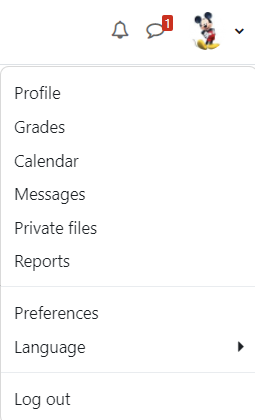
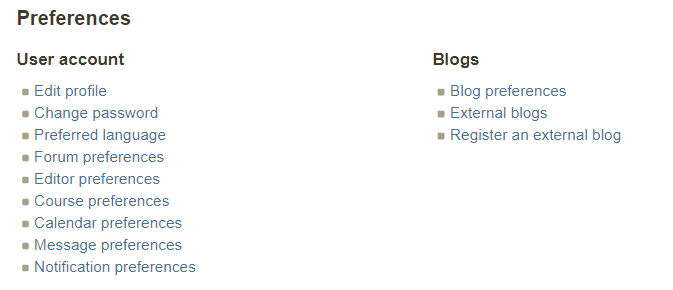
To change your password click on the "Change password" option under "User account"
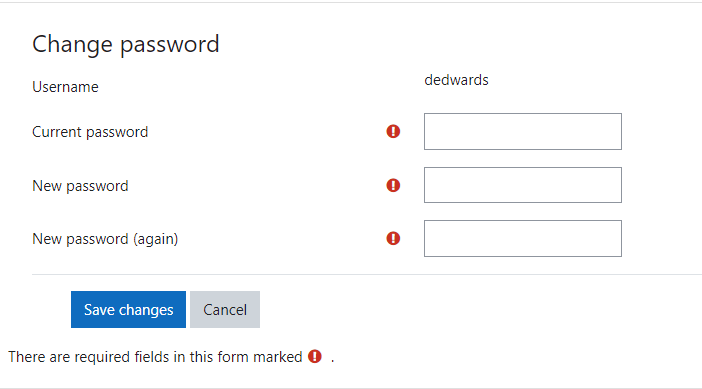
Put in your current password in "Current Password" dialog box
Enter your new password in the "New password" and "New password (again) dialog box.
背景色
フォント
フォントカーニング
文字の大きさ
画像の可視性
文字間隔
行の高さ
リンクの強調
文字の色